Percentage Change Formula: How to Calculate Increase and Decrease
Master the percentage change formula for both increases and decreases. Includes step-by-step examples, a quick reference table, and common pitfalls.
- percentage change
- percentage increase
- percentage decrease
- formula
- math
Whether you are tracking a stock price, comparing this month’s sales to last month’s, or figuring out how much a price went up, you are calculating percentage change. The formula is short, but the sign and direction often trip people up. This guide walks through everything clearly.
The percentage change formula
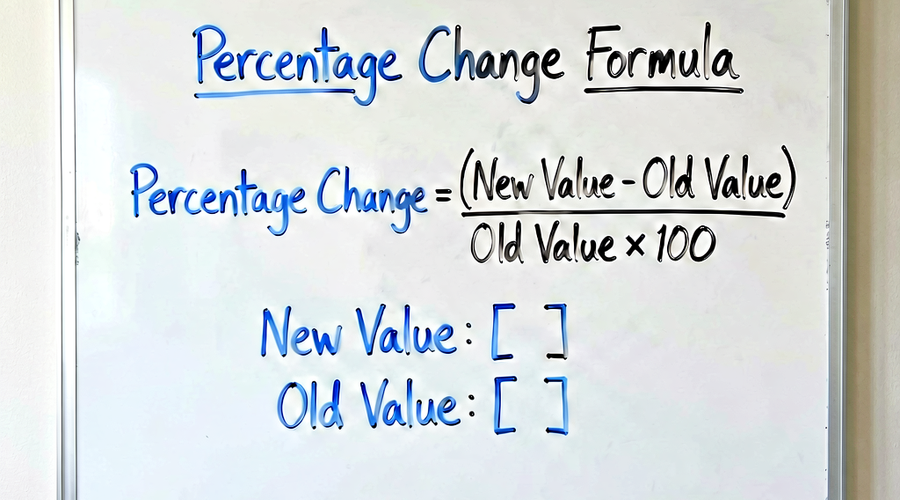
Percentage Change = ((New Value − Old Value) / |Old Value|) × 100The vertical bars around Old Value mean you use the absolute value (strip the negative sign if it is negative). The sign of the result tells you the direction:
- Positive result = increase
- Negative result = decrease
Percentage increase
Use this when the new value is greater than the old value.
Formula:
Percentage Increase = ((New − Old) / Old) × 100Example: Price increase
A coffee shop raised the price of a latte from $4.00 to $4.80.
Percentage Increase = ((4.80 − 4.00) / 4.00) × 100
                    = (0.80 / 4.00) × 100
                    = 0.20 × 100
                    = 20%
The latte price increased by 20%.
Example: Salary raise
An employee earned $50,000 last year and earns $54,500 this year.
Percentage Increase = ((54,500 − 50,000) / 50,000) × 100
                    = (4,500 / 50,000) × 100
                    = 0.09 × 100
                    = 9%
Their salary increased by 9%.
Percentage decrease
Use this when the new value is less than the old value.
Formula:
Percentage Decrease = ((Old − New) / Old) × 100This version gives a positive number representing the magnitude of the drop. Alternatively, you can use the general formula — you will just get a negative number, which also communicates the decrease.
Example: Retail discount
A jacket originally priced at $120 is now on sale for $90.
Percentage Decrease = ((120 − 90) / 120) × 100
                    = (30 / 120) × 100
                    = 0.25 × 100
                    = 25%
The jacket is 25% cheaper.
Example: Website traffic drop
A blog had 8,400 visitors in March and only 6,720 in April.
Percentage Change = ((6,720 − 8,400) / 8,400) × 100
                 = (−1,680 / 8,400) × 100
                 = −0.20 × 100
                 = −20%
Traffic decreased by 20%.
Step-by-step process
- Identify the old value (starting point, baseline, original).
- Identify the new value (ending point, current, updated).
- Subtract: New − Old. Note the sign.
- Divide by the old value (use absolute value if old value is negative).
- Multiply by 100 to express as a percentage.
- Interpret the sign: positive = increase, negative = decrease.
Worked examples at a glance
| Scenario | Old Value | New Value | Change | % Change |
|---|---|---|---|---|
| Stock price up | $25.00 | $31.25 | +$6.25 | +25% |
| Product price down | $80 | $64 | −$16 | −20% |
| Population growth | 1,200,000 | 1,320,000 | +120,000 | +10% |
| Monthly sales drop | $42,000 | $37,800 | −$4,200 | −10% |
| Test score improvement | 55 | 77 | +22 | +40% |
What if the old value is zero?
The formula breaks down when the old value is zero because you cannot divide by zero. In practice this situation means you are starting from nothing and adding something — a 0-to-something change has no meaningful percentage representation. You would typically describe this as “went from zero to X” rather than as a percentage change.
If the old value is negative (for example, a company that went from a loss of $10,000 to a profit of $5,000), the formula still works mathematically, but the result is difficult to interpret intuitively. In those cases, many analysts simply note the change in absolute terms alongside the direction (e.g., “swung from a $10K loss to a $5K profit”).
Percentage change vs. percentage points
Suppose the unemployment rate drops from 6% to 4.5%.
- Percentage point change: 4.5 − 6 = −1.5 percentage points
- Percentage change: ((4.5 − 6) / 6) × 100 = −25%
Both statements are true, but they mean very different things. A 25% reduction in the unemployment rate sounds much more dramatic than a 1.5 percentage point reduction, yet both describe the same event. Always specify which you mean.
Chained percentage changes are not additive
If a price increases 20% and then decreases 20%, you might expect to be back where you started. You are not.
- Start: $100
- After +20%: $100 × 1.20 = $120
- After −20%: $120 × 0.80 = $96
A 20% increase followed by a 20% decrease leaves you at 96% of the original — a net loss of 4%. The reason is that each percentage is calculated on a different base. This matters for investment returns, pricing strategies, and any multi-step analysis.
Reverse percentage change: finding the original value
Sometimes you know the percentage change and the new value, and you need to find the original.
Formula:
Old Value = New Value / (1 + (% Change / 100))Example: A price increased by 15% and is now $92. What was the original price?
Old Value = 92 / (1 + 0.15) = 92 / 1.15 = $80For a decrease:
Old Value = New Value / (1 − (% Change / 100))Example: After a 25% drop, a stock trades at $60. What was the original price?
Old Value = 60 / (1 − 0.25) = 60 / 0.75 = $80Use the calculator
The formula is straightforward once you have the old and new values in hand, but it is easy to make arithmetic errors under pressure. Our percentage calculator handles percentage increase, percentage decrease, and reverse lookups in seconds — just enter two numbers and it does the rest.
Related reading
-
Percentage Difference vs. Percentage Change: What's the Difference?
Percentage difference and percentage change are not the same thing. Learn when to use each formula, see worked examples, and avoid the most common mistake.
-
What Percentage Is X of Y? The Simple Formula Explained
Learn the one formula that answers 'what percentage is X of Y?' — with worked examples, a reference table, and tips for getting it right every time.